

Echez Tech Hub
An edtech project, where I had a hands-on experience working on the startup's multi-page website and Education Management System (EMS). Designed for multi users (student, tutor, admin and super admin).
Company
Echez Tech Hub
Industry
Edtech, Education
Role
Product Designer
Year
2026
Tools
Figma
Intro.
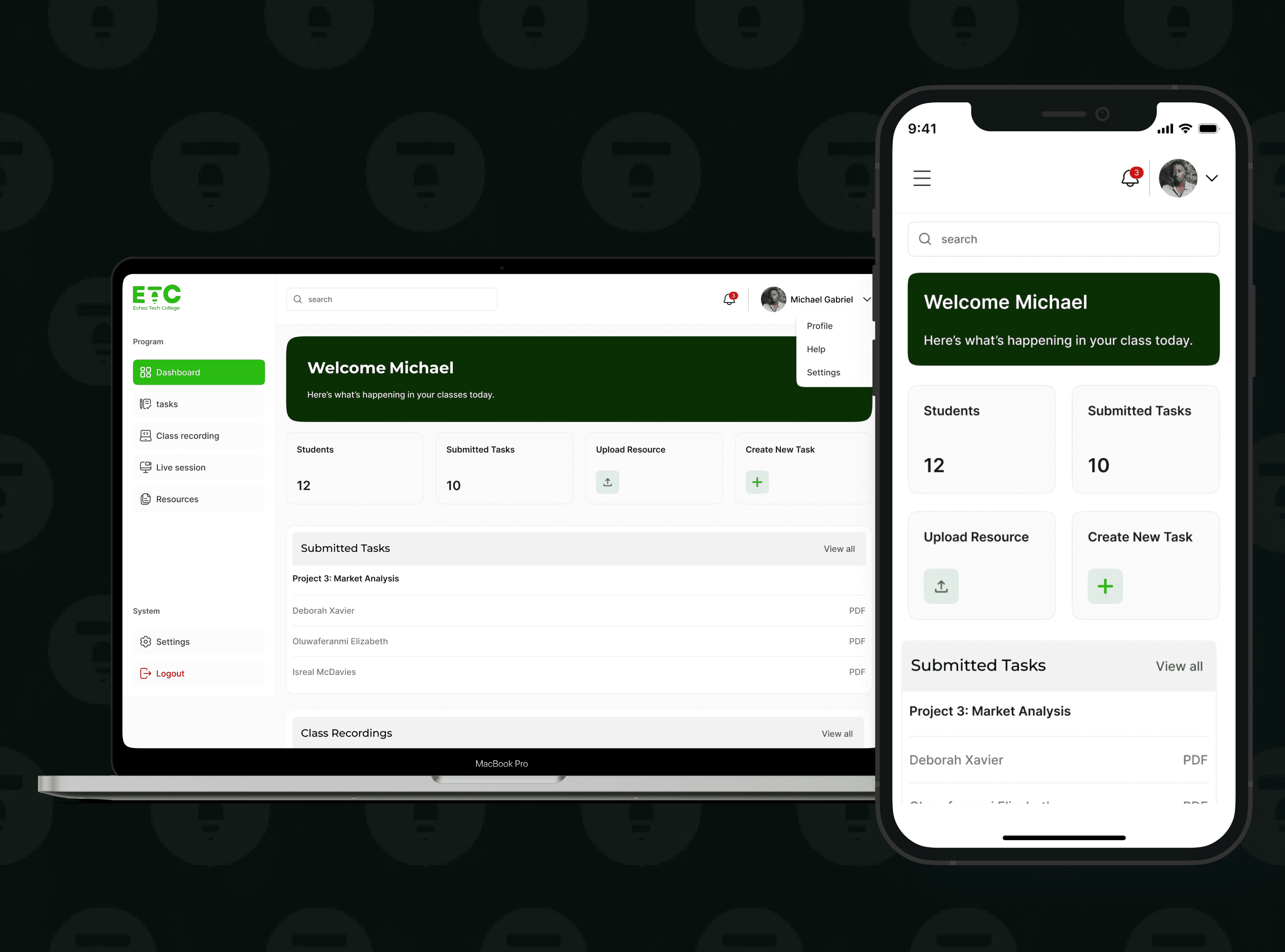
The goal was to design a clean, modern website and an Education Management System (EMS) for Echez Tech Hub, a training and tech services company. The website would help visitors quickly understand what Echez offers, explore courses, and contact the team, while the EMS would support students, tutors, and admins with a structured learning experience, clear task submissions, resources, and live session access.
Problem & Context
Echez Tech Hub needed a digital experience that could clearly communicate their offerings and also support their training operations. They needed centralized process for managing students, tutors, tasks, and resources, which would make learning and administration easy.
Key breakdowns
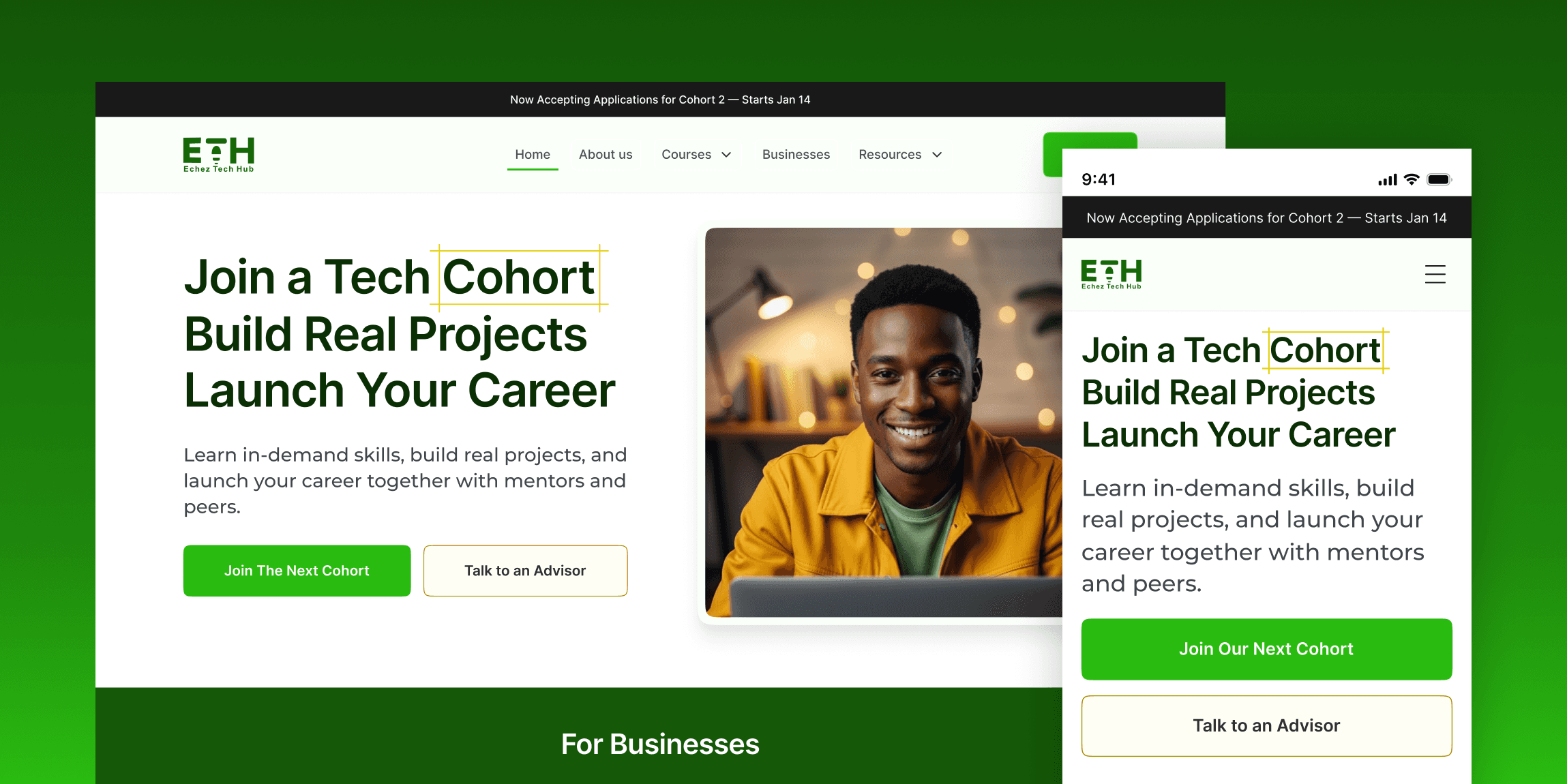
Echez needed a clear digital presence that converts: The brand needed a website that clearly explains what they do, who they serve (students and businesses), and guides users into the right action, without confusion or information overload.
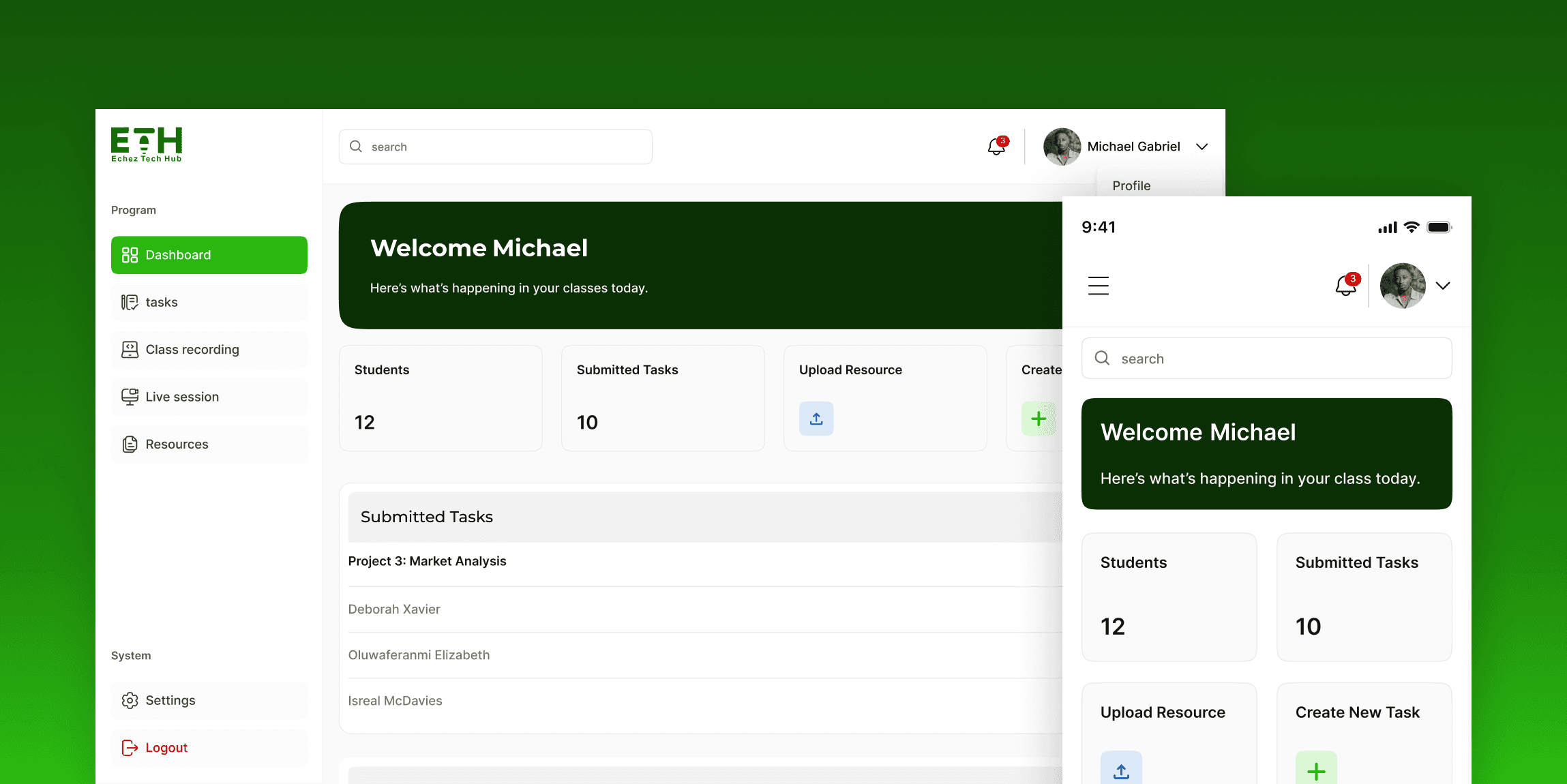
There was no structured system to support the learning experience: Echez needed an EMS that could properly support students during training, from joining live classes, accessing resources, submitting tasks, and staying organized throughout the program.
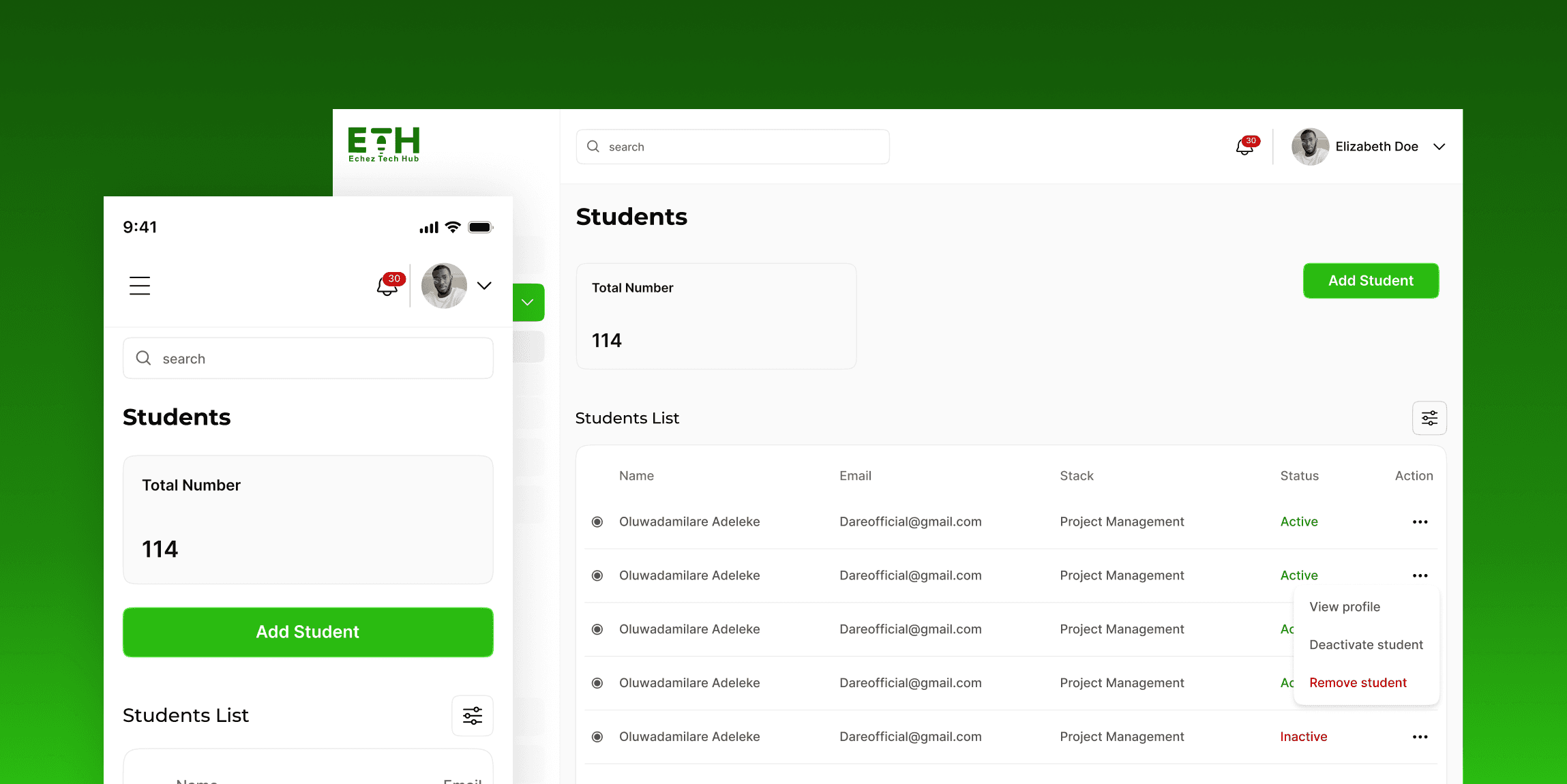
Managing tutors, cohorts, and student progress needed admin control: To run training smoothly at scale, the platform needed an admin dashboard that makes it easy to manage cohorts, enrollments, submissions, live sessions, and overall activity, without manual tracking.
The challenge wasn’t only to design a good-looking website or dashboards, it was to create a clear system that supports the full learning journey: from discovery and enrollment, to live classes, submissions, resources, and admin oversight, all without confusion or unnecessary steps.
Research & insights
Before designing Echez Tech Hub’s website and EMS, I reviewed how tech training brands present their programs, and how students and tutors currently interact with learning portals, especially in real, day-to-day learning situations.
Key breakdown
What I looked at:
How tech bootcamps structure their websites (home, courses, business services, careers, contact).
How students typically explore courses and decide to enroll.
Common patterns in learning dashboards (tasks, live sessions, recordings, resources).
How tutors manage assignments and student submissions.
Admin workflows for managing cohorts, enrollments, and platform activity.
UX patterns from similar platforms like AltSchool, Semicolon, Coursera, Udemy, and a few local bootcamps.
Key Insights:
People don’t read websites deeply, they scan fast, so the structure must be clear and direct.
Students want a simple learning portal that shows exactly what to do next.
Tutors need an easy way to publish class links and manage submissions without manual back-and-forth.
A resources system must support multiple formats (PDFs, links, images, docs) and still feel organized.
Admin dashboards need visibility and control across students, tutors, and cohorts, without overwhelming complexity.
The biggest risk wasn’t design, it was confusion. So clarity had to drive every layout decision.
This research made it clear what Echez Tech Hub needed to prioritize: clarity, structure, and a smooth learning experience across all user roles.
Strategy & Key Decisions
The insights I got from the research helped guide the design strategy for the website and EMS.
Key breakdowns
The website was structured for fast scanning, not long reading.
The experience was separated clearly by audience: Students vs Businesses.
Courses were designed to be easy to browse, with clear CTAs and simple course detail pages.
The EMS dashboard was built around learning actions (tasks, resources, live sessions), not random widgets.
Live classes were treated as a primary feature, so “Join Live Session” was made easy to find.
Task submissions were structured to reduce confusion (students submit under the right task/week, tutors review by task).
Resources were designed to support multiple formats (files + links) while still staying organized.
Admin features were structured around operational control: cohorts, enrollments, submissions, and logs.
Payment and financial flows were excluded to match the real business process (handled off-platform).
This gave me a clear direction for the pages, dashboards, and flows that needed to be designed.
Testing & Iteration
After building the main flows, I shared the prototype for quick review and feedback to validate the structure, catch usability issues, and improve the experience where necessary.
Key breakdowns
The course section header copy was rephrased
Payment flow took a new route from "signup before payment" to "payment before signup"
Outcome & Impact
The final solution focuses on clarity, structure, and ease of use, helping Echez Tech Hub attract the right users and deliver a smoother learning experience across students, tutors, and admins.
Key breakdowns
What the solution achieved:
A clear, well-structured website that explains Echez’s offerings at a glance.
Separate paths for key audiences: Students and Businesses.
A full course experience: course listing -> course details -> enrollment flow.
A student dashboard built around real learning actions (tasks, resources, live sessions).
A tutor dashboard that supports teaching workflows (publish links, manage tasks, upload resources).
An admin dashboard that gives full operational control (users, cohorts, Announcements, submissions, logs).
A consistent design system across the website and EMS for scale and future updates.
Impact:
Faster decision-making for website visitors due to clearer structure and messaging.
Reduced confusion for students by giving them one place to learn, submit tasks, and access resources.
Reduced admin workload by centralizing cohort, enrollment, and submission management.
Better tutor efficiency through structured task review and resource publishing.
A stronger brand presence that supports trust and credibility.
How success is measured:
Higher course inquiry and enrollment conversions from the website.
Reduced drop-offs during course exploration and signup.
Fewer support questions about “where to find” tasks, links, or resources.
Faster admin operations for cohort and enrollment management.
Get In Touch.
Have a project in mind? I’ll respond ASAP.